Posts

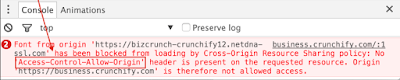
How to fix Access-Control-Allow-Origin (CORS origin) in Tomcate
Image
CORS On Tomcat During debugging spring source code via intellij(Editor) , sometime we get CORS issue in console .  This is a very basic configure issue in Apache tomcat , during the execute you source code .   How to fix Access-Control-Allow-Origin (CORS origin). By use of following changes , you have to changes in the web.xml(src\main\webapp\WEB-INF) file  <filter> <filter-name>CorsFilter</filter-name> <filter-class>org.apache.catalina.filters.CorsFilter</filter-class> <init-param> <param-name>cors.allowed.origins</param-name> <param-value>(http://localhost:8082 or * ( means any port value) </param-value> </init-param> <init-param> <param-name>cors.allowed.methods</param-name> <param-value>GET,POST,HEAD,OPTIONS,PUT</param-value> </init-param> <init-param> <param-name>co...
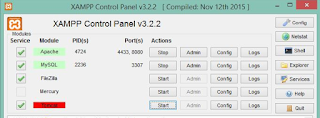
Error-Using unique option prefix 'key_buffer' is error-prone and can break in the future. Please use the full name 'key_buffer_size' instead

Hi Guys, Error Description : Using unique option prefix 'key_buffer' is error-prone and can break in the future. Please use the full name 'key_buffer_size' instead. shutdown unexpectedly This may be due to a blocked port, missing dependencies improper privileges, a crash, or a shutdown by another method Solution : Do not afraid, it's a pretty simple solution. Go to mysql/data/ or (xampp\mysql\data\)  Delete all random files (except the actual database folders) ( in xampp/mysq/bin/ib_logfile1,ib_logfile0,ibdata1,aria_log_control,mysql.pid) Restart Apache and MySQL .       hope you will get better solution. Cheers!

ODBC connection with phpmyadmin + Xampp Server

Image
Dear friends, First of all, you must Install Xampp Server >=3.2.2 in your local machine and you should start Apache, Mysql and Tomcat as shown above the screen. Our Goal: Display a simple list of data from myself, using  PHPMyAdmin(Xampp server)  and JSP ODBC Connection jar file. Tomcat: Tomcat nomenclature have the same structure in Xampp server also but few things you must keep in mind java.policy and valid connector jar file in lib folder according to xampp version. Location : xampp\tomcat\webapps\user\WEB-INF\lib\connection.jar files xampp\tomcat\webapps\foldername\ list.jsp file Challenges: If you are facing the port or permission issue while connecting PHPMyAdmin with odbc.  You must look into the policy. java file in your java 's lib folder.This is a very prominent file. anything would you like to change, Please take the backup first. Path :install_root/java/jre/lib/security/java.policy  Upda...

Observer in magento

Send Email/ Sms on Change Order Status in Magento  Steps 1. Create Module Suppose to "Sendsms_Custmail"  copy and paste the following code into app/etc/modules/ Sendsms_Custmail.xml <?xml version="1.0" encoding="UTF-8"?> <config>     <modules>         <Sendsms_Custmail>             <active>true</active>             <codePool>local</codePool>         </Sendsms_Custmail>     </modules> </config> Steps 2. now Create the Observer.php file and put the following path  app\code\local\Sendsms\Custmail\Model\ <?php class Sendsms_Custmail_Model_Observer {      public function invoicedStatusChange($event)     {         $order = $event->getOrder(); $orderStatus = $order->getStatus();        ...

HOW TO FIX ACQUIRING NETWORKING ADDRESS

There are few steps we can resolved Acquiring Networking Address issue during to connect wireless  internet connection. Step1.   Unplug the cable /DSL Modem (Digital Subscriber  Line) Step2 .  Unplug the wireless router. Step3.  Wait for 60 sec. then plug in the modem. Step4. When the modem I completely online plug in the wireless router Step5.  On the Pc ,open a command prompt (Cmd ) on window vista ,click  the window orb, type “cmd.exe”. when cmd.exe appears under programs , right click it , and select “Run as administration ” On window Xp, click start ,Run ,type cmd OK . Step 6. Once you have a command prompt ,first type “Ipconfig /flushdns”. Step7. Next, type “ ipconfig/release”. Step8 . Then type ipconfig /renew , Click your wireless connection status in your computer then click properties . Now you will see your preferred connection then remove it and restart  again your Router then add again wireless Network...

Eager Loading vs Lazy Loading in MVC pattern

I am describing basic difference between Eager Loading vs Lazy loading.  Eager Loading :1 .Resource loading.    2. Since eager fetching load all relationship , it's a big  performance hog.    3. Eager fetching makes for easier programming , since less code is required.  Lazy loading :   1. Time consuming.      2. Lazy fetching doesn't load any relationship unless told to, which lead to better                                       performance.    3. Lazy loading could lead to bugs if entire system isn't           properly tested.

URL redirect/rewrite using the .htaccess file

Q How to redirect http to https RewriteEngine on RewriteCond %{HTTPS} off RewriteRule ^(.*)$ https://%{HTTP_HOST}/$1 [R=301,L] Q How to redirect http:// to https://www RewriteEngine on RewriteCond %{HTTPS} off RewriteRule ^(.*)$ https://www.%{HTTP_HOST}/$1 [R=301,L] Q How to redirect non-www to www RewriteEngine On RewriteCond %{HTTP_HOST} !^www\. RewriteRule ^(.*)$ http://www.%{HTTP_HOST}/$1 [R=301,L] Q How to redirect all pages to newdomain RewriteEngine On RewriteBase / RewriteCond %{HTTP_HOST} !^olddomain\.com$ [NC] RewriteRule ^(.*)$ http://newdomain.com [R=301,L] Q What is meaning of L & R flag in htaccess htaccess L fag causes to stop processing the rule set, if the rule matches, no further rules will be processed htacces R flag causes a HTTP redirect to be issued to the browser and 301 means its permanent redirect. Q How to redirect homepage to another Website Redirect / http://www.khunt.com/ Q How to redirect to another directory within s...